Hosting Tiers (8)
Why Budget Shared cPanel LVE Fails at 25+ Concurrent Quiz Takers
Dissect CloudLinux Entry Process (20 EP) and 2 GB PMEM limits that trigger instant 503 Resource Limit Reached errors during LearnDash cohorts.
20 EP Cap / 2 GB PMEM = Hard 503 Cliff at ~18 Takers
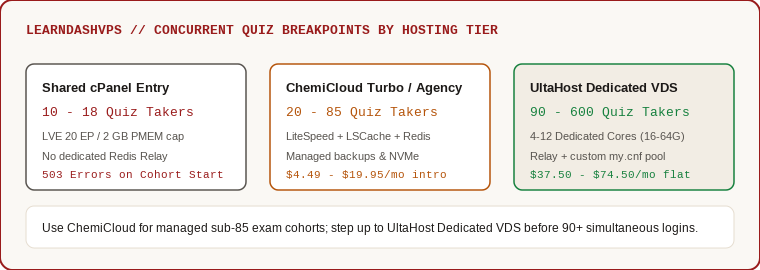
The CloudLinux LVE Math Behind 503 Quiz Errors
Budget shared cPanel accounts enforce strict CloudLinux Lightweight Virtual Environment (LVE) caps: typically 1-2 vCPU, 20 Entry Processes (EP), and 2 GB Physical Memory (PMEM). Because an uncached LearnDash + BuddyBoss request consumes 245-310 MB, hitting just 7-8 overlapping PHP requests exhausts PMEM and triggers HTTP 503.
I/O Throttling on wp_learndash_user_activity Writes
Shared tiers also throttle disk IOPS to 10-20 MB/s. When 25 students submit quiz answers together without Redis offloading, MariaDB queries queue behind I/O limits, backing up Entry Processes until the entire academy freezes.
Measured Thresholds & Configuration Targets
| Shared LVE Parameter | Typical Budget Cap | LearnDash Burst Impact |
|---|---|---|
| PMEM (Physical RAM) | 1.5 - 2.0 GB | Kills PHP above 6-8 simultaneous requests |
| EP (Entry Processes) | 20 max processes | 503 Resource Limit Reached at ~18 takers |
| Disk I/O Limit | 10 - 20 MB/s | MariaDB quiz writes stall > 900 ms |